
How to Use a Bike-Share System in a New City: No Phone Fix
This post contains affiliate links. As an Amazon Associate, we earn from qualifying purchases.
Shared bikes work on a simple loop: release the bike, ride it, park it, end the trip. The friction is never the riding. It is the wait after you scan, when you are standing in an unfamiliar city waiting for a light to turn green and hoping you did it right, much like the pause when learning how to use a bike-share system in a new city, or when buying a metro card for the first time.
How to use a bike-share system in a new city comes down to four moves: release the bike with the local method, ride to a station, dock or park it by that operator’s rule, and confirm the trip actually ended. The confirmation signal differs by city, and that is where most visitors get it wrong.
Four moves. That is the whole thing. The problem is that move three changes depending on which city you woke up in, and move four is the one everybody skips, just like the first time you are using the London Underground.
I have stood at a Barcelona dock watching a rear wheel lock refuse to release because the bike was not quite seated, a feeling familiar to anyone figuring out how to use a bike-share system in a new city, or using the Paris Metro for the first time. I have also watched a friend walk away from a Portland rack convinced the ride was over when it was still running, the same false confidence people get when using the NYC subway for the first time. Both mistakes cost time. One of them costs money.
What follows is the sequence, the four confirmation signals you need to recognise, and the specific failures that break the standard procedure. I have built the rest of this around the operator documentation, because that is the only place the real rules live.
Key Takeaways
- Learn your city’s confirmation signal before you ride. Bluebikes and Citi Bike use a green light plus a “ding”; Metro Bike Share uses three beeps when docking; AMBici uses an acoustic click plus an app confirmation.
- End-of-ride rules are not universal. AMBici runs station-to-station only, while BIKETOWN lets you park at any public bike rack inside the service area for an additional charge.
- A full station is not a dead end. AMBici riders check the app for the nearest station with space, or use a +P overflow space and wait 10-15 seconds for the lock to register.
- Never force a jammed lock. If the rear wheel lock catches on a spoke, move the wheel slightly, tap “Open lock” again, and leave the bike alone.
- Improper parking carries real money. Seattle adds a $20 fee to the ride for badly parked devices, and BIKETOWN charges an additional $1 for rack parking outside a station.
How Do You Unlock a Shared Bike?
The method for releasing a bike is the first place a new city trips you up, because there is no single standard. Four different systems use four different routes to the same result.
Scanning a QR code is the most common path, and it is the one most visitors default to. On Bluebikes and Citi Bike, the code sits between the handlebars or on the rear fender. You scan it, then wait for the green light and the “ding” that confirms the dock has released.
A shared bike unlocks when the dock or onboard lock receives a valid rental authorisation and releases the wheel. Operators signal that release differently: a green light plus an audible tone on Lyft-operated systems, three beeps on docking at Metro Bike Share, and an acoustic click with app confirmation on AMBici’s Barcelona fleet.
AMBici is the outlier worth knowing about, because it has a documented wait. Scan the QR code and the rear wheel lock opens after 10–20 seconds. If you are standing there at second six wondering whether it worked, it is working.
The Kiosk Route, If Your Phone Is Dead
Every docked system I looked at keeps a kiosk fallback, and it is the reason a dead battery does not end your day. At a Citi Bike kiosk you press the “Getting Started” button, insert a credit or debit card, and receive a 5-digit ride code. That code goes into the keypad on the dock next to an available bike, and each code is good for one single use.
Bluebikes runs the same system. If you want a second ride while your pass is still active, insert the same credit card into the kiosk for a new code. You are not charged again.
The Lyft app adds a third path on top of both. Connect your Citi Bike account in the “Linked Accounts” section of your profile, tap “Unlock a bike,” and scan the QR code on the handlebars. If the scan fails, tap the small keyboard icon and type the chainstay number by hand.
Bike Keys and the Offline Station Trap
A bike key is the fastest way to release a bike in the system, right up until it silently fails. Citi Bike’s help page is blunt about why: a bike key will not release a bike at an offline station. The fix is to check you are standing at an online station before you start troubleshooting anything else.
Bluebikes describes the same hardware without the caveat. Insert the key into the slot on the dock next to an available bike and wait for the green light. New keys need activating first, which you do by logging into your account online and entering the ID code printed below the barcode.
| Operator | Unlock Method | Confirmation Signal |
|---|---|---|
| Bluebikes | QR scan, kiosk code, or bike key | Green light plus “ding” |
| Citi Bike | QR scan, kiosk code, bike key, or Lyft app | Green light plus “ding” |
| AMBici | QR scan | Acoustic click plus app confirmation |
| Metro Bike Share | App unlock | Three beeps on docking |
| BIKETOWN | BIKETOWN or Lyft app QR scan | App confirmation |
Easy to miss: A bike key that will not turn usually means an offline station, not a dead key. Walk to the next station before you assume the key is broken.
Does Every City Let You Park Anywhere?
No, and this is the rule that costs visitors the most money. Docked and dockless systems disagree about where a ride can end, and the disagreement is not a detail.
AMBici states it categorically: rides are always from station to station, and you never leave the bicycle outside a station. The only exception is a designated +P overflow space, and even that requires the proper procedure. Interrupting a ride by locking the bike outside a station is not permitted except in exceptional cases and only after contacting User Support.
BIKETOWN takes the opposite position. Find an open space at any BIKETOWN station, or park at any public bike rack within the service area for an additional $1. Same task, opposite rule, both published by the operator.
That is the practical wisdom you need here: read the parking rule for the specific system you are riding, not for bike-share in general. They are not interchangeable.
What to Do When the Station Is Full
A full docked station breaks the standard procedure, and AMBici is the only operator in this set that documents what to do. Check the app for the nearest station with space. That is the default answer.
At a +P station, the procedure changes. Park between two docked bikes, lower the kickstand, close the rear wheel lock, and wait 10–15 seconds for the lock to register. The wait is the part people skip, and skipping it means the ride stays open.
Citi Bike handles overflow differently and only in specific places. Certain stations in Jersey City or Hoboken have overflow parking areas when the station is full or near full, marked by a white pin in the app. Those overflow ebikes can be rented by scanning one in the app, which frees up parking for the next rider.
The Fee Nobody Reads About
Improper parking is not a scolding. It is a line item.
Seattle adds a $20 fee to your ride when a shared scooter or bike is badly parked, and the city is explicit about why: badly parked devices cause problems for people using sidewalks, especially wheelchair users and people who are blind or have low vision. BIKETOWN charges an additional $1 for ending a ride at a public bike rack outside a station.
Common mistake: Walking away once the bike is physically parked. On every docked system, the ride ends when the lock registers, not when you stop touching the bike.
Why Did My Ride Not End After Docking?
Because the lock did not register, and the fix is almost always mechanical rather than digital. AMBici’s guide covers three specific failures, and they are worth memorising before you need them.
The first is a rear wheel lock jammed on a spoke. The official fix is to move the rear wheel slightly to free the lock, then tap “Open lock” again. Do not force the bike. Forcing it is how a ten-second problem becomes a support call.
The second is an app that still shows the ride as “paused” after you docked. Close and reopen the app, then re-dock or try another dock. The state is stale in the app, not broken on the bike.
The third is the one with a phone number attached. If the rental does not end at all, call the user support telephone number. AMBici repeats that instruction three times in its guide, which tells you how often it happens.
Metro Bike Share approaches the same problem from the other direction. Listen for three beeps when docking. If you did not hear them, the bike is not locked properly, and you should not walk away.
| Symptom | Likely Cause | Fix |
|---|---|---|
| Lock will not close | Jammed on a spoke | Move the wheel slightly, tap “Open lock” |
| App shows ride paused | Stale app state | Close and reopen the app, re-dock |
| No confirmation signal | Lock did not register | Re-dock or try another dock |
| Ride still open after all of it | Rental did not end | Call user support |
| Bike key will not unlock | Offline station | Move to an online station |
Worth knowing before you start: If you cannot end a ride, do not abandon the bike and walk away. The rental stays open against your account until support closes it.
What Changes If You Have No Smartphone?
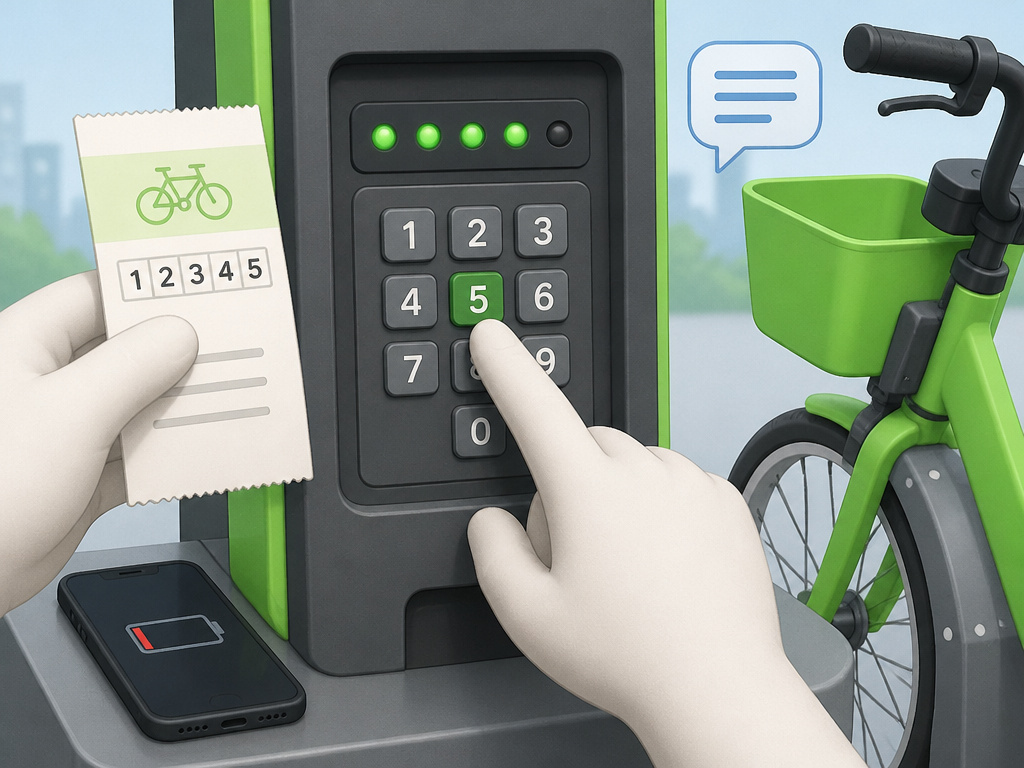
Two documented routes exist, and neither requires an app.
Seattle’s Lime system runs a text-based access line at (415) 463-3473 for riders without a smartphone. That is the only text route in this set of operators.
The kiosk route covers the docked systems. On Bluebikes and Citi Bike, the kiosk issues a 5-digit ride code that you type into the dock keypad, and no phone is involved at any point. If you are travelling without data or your battery is gone, this is the path.
Which Confirmation Signal Should You Actually Listen For?
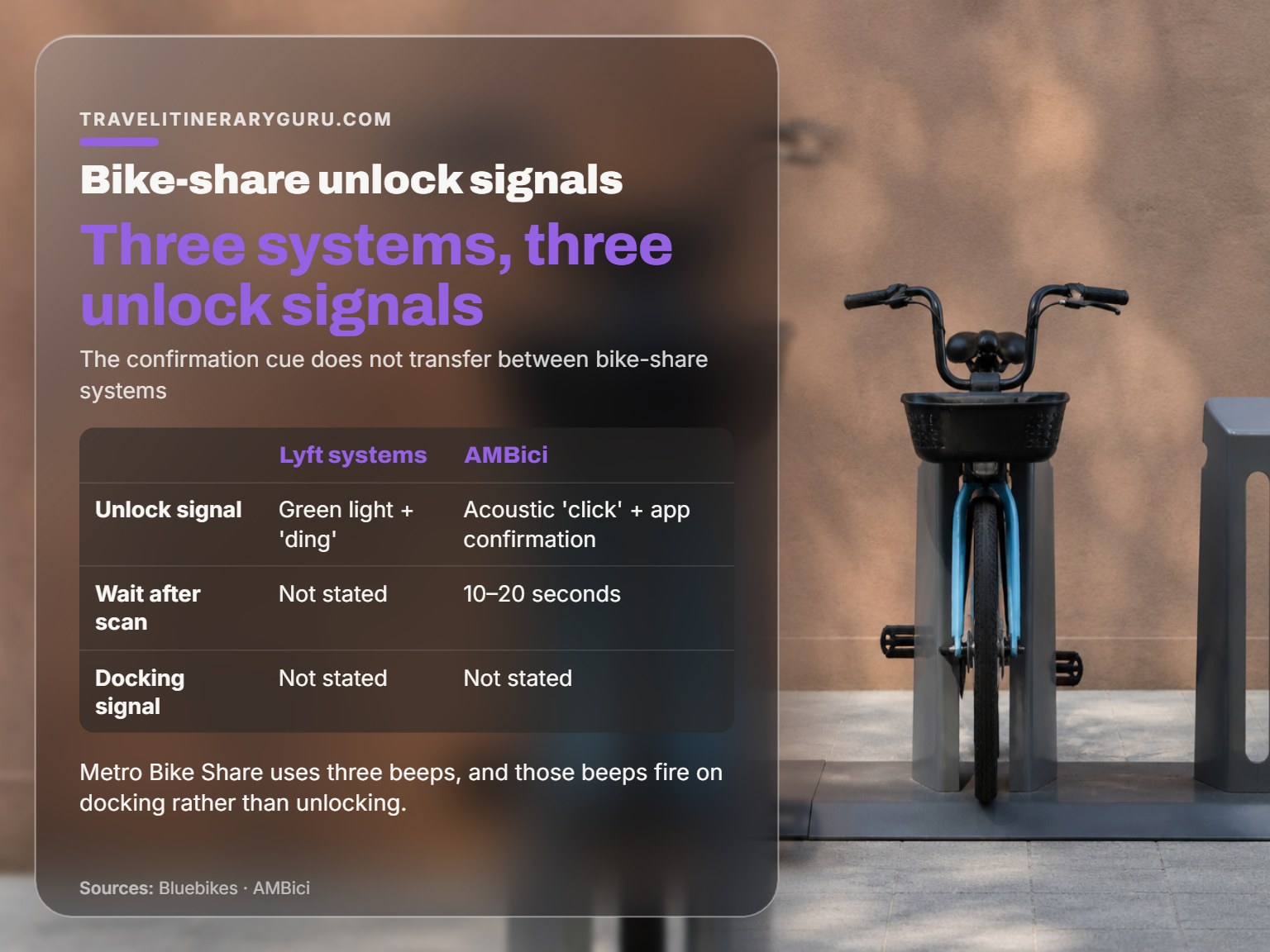
Learn one signal per city and you will stop second-guessing every release. The signals do not transfer between systems, which is the part that catches frequent travellers.
Lyft-operated systems, meaning Bluebikes and Citi Bike, use a green light plus a “ding” when the bike releases. Metro Bike Share uses three beeps, and those beeps fire on docking rather than on release. AMBici uses an acoustic click paired with an app confirmation.
Three operators, three signals. If you ride in Boston on Monday and Barcelona on Friday, the cue you learned in Boston tells you nothing in Barcelona.
The part nobody mentions: The confirmation signal is the only reliable proof the transaction registered. A bike that looks unlocked is not the same as a bike the system has released.
Frequently Asked Questions
Do I need the app to unlock a shared bike?
Not always. Bluebikes and Citi Bike both issue a 5-digit ride code at the kiosk that you enter into the dock keypad, no smartphone required. Seattle’s Lime system offers a text-based access line for riders without a smartphone. The app is the fastest route, but it is not the only one.
What happens if the station is full when I arrive?
On AMBici, check the app for the nearest station with space. At a +P overflow station, park between two docked bikes, lower the kickstand, close the rear wheel lock, and wait 10–15 seconds. Citi Bike riders in Jersey City or Hoboken can look for a white pin in the app marking overflow parking areas.
Why does my app still show the ride as active?
The app state is usually stale rather than the lock being broken. Close and reopen the app, then re-dock or try a different dock. If the rental still does not end, call the operator’s user support number rather than leaving the bike.
Can I park a shared bike at a regular bike rack?
It depends entirely on the operator. AMBici runs station-to-station only and does not permit leaving the bike outside a station except in exceptional cases after contacting support. BIKETOWN allows parking at any public bike rack within the service area for an additional $1.
What is the fee for parking badly?
Seattle adds a $20 fee to the ride for improperly parked shared devices, because badly parked bikes block sidewalks for wheelchair users and people with low vision. BIKETOWN charges extra for ending a ride at a rack outside a station.
Before You Go
One rule beats every other piece of advice on this page: confirm the ride ended before you walk away. On a docked system that means the light, the tone, or the beeps. On an app system it means the screen no longer shows an active rental. Everything else is recoverable. An open rental against your account is the one that follows you home.
Your first move this week, if you have a trip coming: open the operator’s page for the city you are visiting and read the parking rule. Not a general bike-share article, and not a forum thread. The operator’s own page, because that is where the station-to-station versus park-anywhere distinction actually lives.
And a concession, because this advice has limits. If you are in a city with a genuinely excellent metro and you are only making one or two short trips, skip the bike entirely. I have underweighted that trade-off for years because I like the bike-share ritual. The metro is often the better call, and I should say so more often than I do.
